Update · Meta Ads
Meta is adding AI summaries to ads, and they can bypass your landing page
The Website summaries extension can be on by default. It writes a summary from your site and shows it under the ad, and tapping See details opens a page Meta builds inside Facebook. The problem: the prominent button on that page can lead to the homepage instead of the landing page, so someone who tapped an ad for a specific product lands on a generic page. What the feature does, who it hurts and where to turn it off.
VP Marketing at Moburst. Head of specialization at Ono Academic College.
The key points
- What it is
- A Creative setup extension that uses AI to write a summary from your site and Instagram profile, shown under the ad in Feed. It can be on by default.
- The problem
- See details opens a page Meta builds. Its big button can lead to the homepage, and the landing page is reachable only through a small link.
- Who it hurts
- Anyone selling one product out of several. People land on a generic page, and some leave their details for the wrong product.
- What to do
- Switch off Website summaries in Creative setup, check Advanced preview too and go through the ads already running.
Table of contents
By Etgar Shpivak, VP Marketing at Moburst and Head of specialization at Ono Academic College.
What is Website summaries?
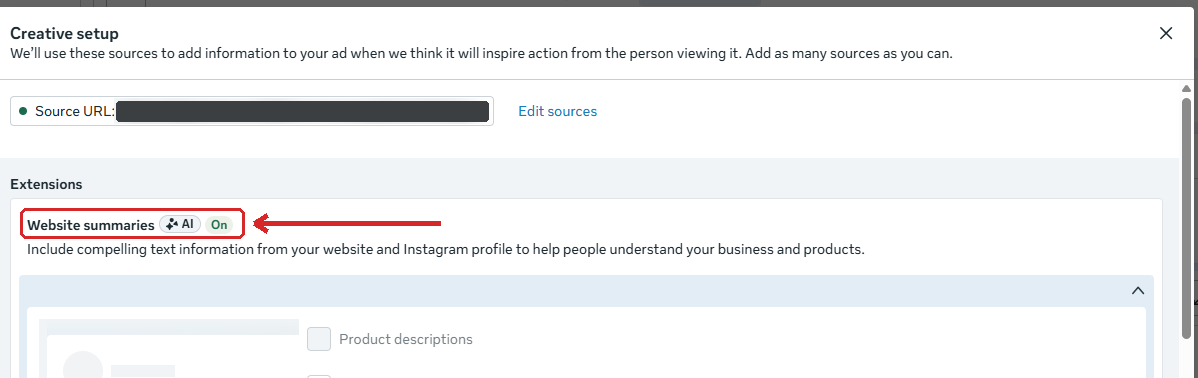
Website summaries is an extension in Creative setup, the window where you configure the creative at ad level. According to the window's own description, it pulls text from your website and your Instagram profile to help people understand what you sell. It carries an AI tag, and it can show up set to On although nobody turned it on. Below it are checkboxes for where that information can appear, such as Product descriptions and Show spotlights.
 Tap to enlarge
Meta's help pages never use the name Website summaries. What matches it there is Show summaries, one of the automatic enhancements in Advantage+ creative. According to Meta, Show summaries uses AI to write a short summary of your selling points and shows it between the ad's footer and the comments, for now only in Facebook Feed and Instagram Feed. For single image or video ads, it may be on by default.
Don't confuse it with Show spotlights, a separate enhancement that also shows text and images from your website (in Creative setup it appears as one of the checkboxes). Meta says Show spotlights runs only in Instagram Stories and Reels, so the line under an ad in Feed comes from Show summaries. Show spotlights may be on by default too, so check it in the same pass.
What do people see when it's on?
When the extension is on, a line of marketing phrases about the business appears under the ad in Feed. The advertiser never wrote them. A See details button sits next to the line. Tapping it opens a page inside Facebook: a headline, a list of benefits with icons, a "why choose us" section and testimonials. All of it is written automatically from the website.
The page has a big blue button at the top and again at the bottom, labeled with the advertiser's Page name. Under the bottom one, in small type, is a View website link. The problem is that the big button can lead to the site's homepage: a generic page about every product, sometimes in a different language from the ad. Only people who tap the small link reach the landing page set in the ad.
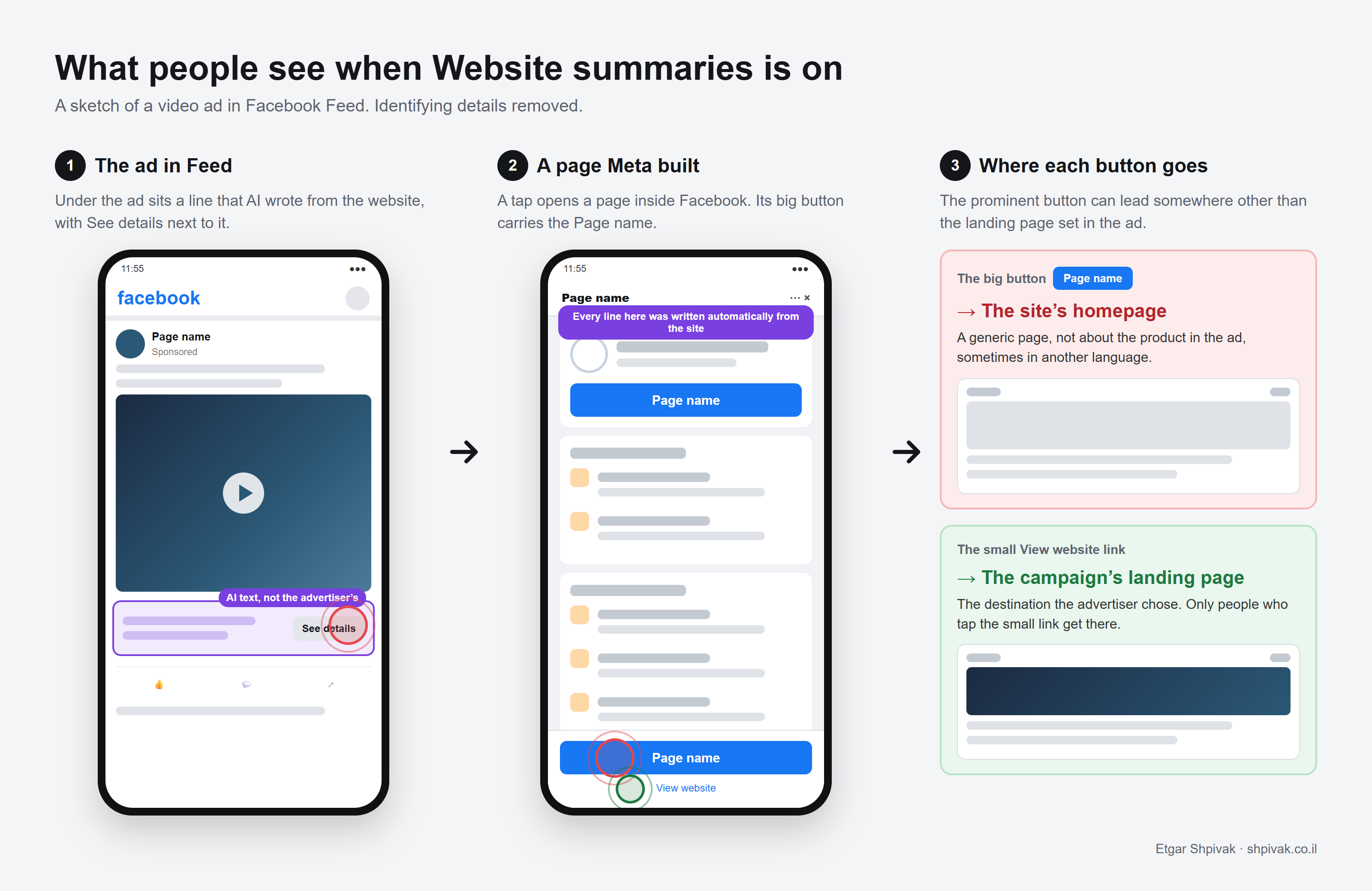
This can happen even when the Source URL in Creative setup is the campaign's landing page, that is, when Meta knows where the ad is meant to go. Meta doesn't document the See details page or say where the big button takes its destination from. My untested guess is that it uses the website listed on the Facebook Page.
Why is it a problem?
Why is it easy to miss that it's on?
The setting sits under Extensions with a small On tag, and you can get through the creative step without opening it. In the standard preview, too, a single line under the video is easy to miss.
What happens to someone who lands on the homepage?
If you sell one product out of several, say a specific degree program, one model or one service in a catalog, you build a landing page for the campaign: the ad's message, the form and the questions that filter leads. The homepage talks about everything.
Someone who tapped an ad for a specific product lands on a page where that product is one link among many, and sometimes in a different language from the ad. Some leave. Some fill in the site's general form, and the lead arrives with no product attached, or for a different product altogether. That is how a campaign that was working can start bringing in irrelevant leads.
Check your analytics for Facebook visits that land on the homepage while the campaign points elsewhere. If that number went up with no change to the campaign, this is a suspect.
Who is responsible for what the AI wrote?
The summary runs under the advertiser's name, drawn from the site and the Instagram profile, and nobody signed off on it. An offer that has ended can show up under the ad. So can a scholarship from a different program, or wording your legal team would never approve.
Meta's updated Commercial Terms add a section on AI features. Under it, the advertiser alone carries the risk of those features and of the content they produce, and Meta adds that they may make mistakes. The new terms are scheduled to take effect on November 20, 2026, after one delay already, and Meta has said the date may slip again.
Who can live with it?
A business with one product, whose homepage already talks about it. There the summary may even help, because people get the point quickly. But that call belongs to the advertiser, before the ad goes live.
Why does Meta switch these settings on without asking?
This isn't a one-off. In November 2025 advertisers reported that Meta had switched on Reveal details over time in active ads, even in accounts where creative AI testing was turned off. In October 2026 Meta told advertisers it would add product browsing to existing ads from the 28th: when people tap the ad, they may see an experience on Facebook or Instagram with product info and personalized suggestions. And I've written here about Discovery links in Website highlights, which are on by default in the same Creative setup window and send part of the traffic to other pages on your site.
I think the direction is plain: people stay longer inside Meta's apps, and the system makes more decisions in the advertiser's place. For Website summaries I found no proper announcement, only a general line on a help page saying some enhancements may be on by default. Meta measures success in clicks and leads, and the advertiser measures it in customers. When the prominent button goes to the wrong page, those numbers drift apart.
How do you turn off Website summaries?
Three places to check. The first is the window in the screenshot above; Meta's help pages describe the other two.
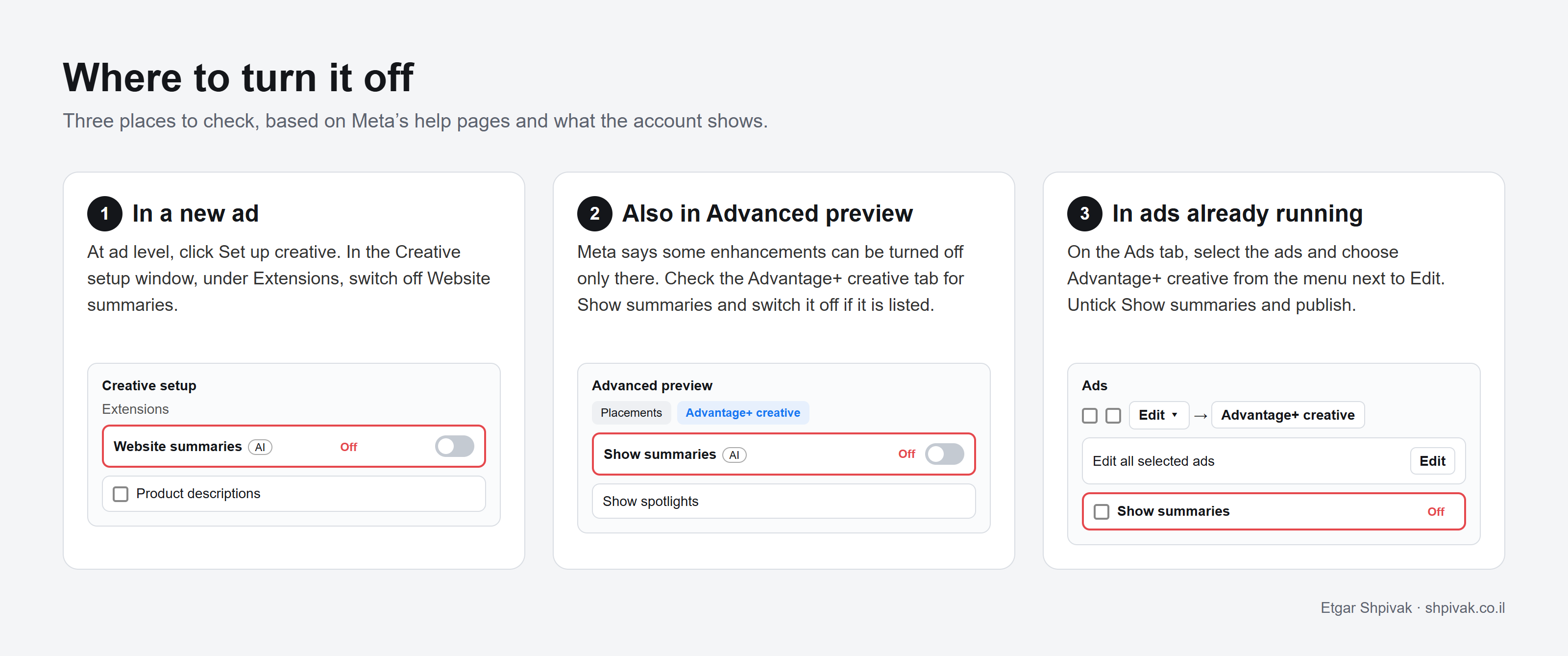
1. In a new ad: at ad level, click Set up creative. In the Creative setup window, under Extensions, switch off Website summaries. While you're there, go through the other extensions too, such as Website highlights and Discovery links.
2. Also in Advanced preview: Meta says some enhancements can be turned off only there and don't appear in the Creative setup window. In the ad preview, click Expand and go to the Advantage+ creative tab. If Show summaries or Show spotlights is listed, switch it off.
3. In ads already running: on the Ads tab, select the ads (they must share a format), open the menu next to Edit and choose Advantage+ creative. Under Edit all selected ads, click Edit, untick Show summaries and publish (Meta's steps). Meta says editing a running ad starts a new review, so do it when traffic is low. Meta doesn't say whether switching it off affects the learning phase.
Then check for yourself: open the ad on your phone, inside Facebook, and look for the line under the video. If it's still there, something is still on.
If you keep the summary, read it before the ad goes live and check where the big button leads. Another setting in that window, the product catalog, has turned itself on when an ad was duplicated, so check again on every new ad and every duplicate.
What to do now
Four checks, in order
- Turn off Website summaries At ad level, in Creative setup, under Extensions.
- Check Advanced preview If either Show summaries or Show spotlights is listed on the Advantage+ creative tab, make sure it is off.
- Go through running ads Bulk edit from the Ads tab and check again on every new ad and every duplicate.
- Open the ad on your phone Inside Facebook. If a See details line still shows under the video, something is still on.
Questions and answers
What is Website summaries in Meta ads?
Is Website summaries on by default?
What is the difference between Show summaries and Show spotlights?
Where does the big button on Meta's summary page lead?
Why can Website summaries bring in irrelevant leads?
How do I turn off Website summaries in Meta Ads Manager?
Sources
- Meta Business Help Center: About Advantage+ creative Defines Show summaries and Show spotlights, and says they may be on by default
- Meta Business Help Center: Turn off Advantage+ creative enhancements Turning enhancements off during and after ad creation, including Advanced preview
- Meta Business Help Center: Bulk edit Advantage+ creative enhancements Bulk editing ads already running
- Meta Business Help Center: About ads in review Editing a running ad starts a new review
- Meta Commercial Terms (updated version) The AI Features section, scheduled for November 20, 2026 (not final)
- Nieman Lab: Meta pledges to consult publishers before finalizing its new terms Meta said the date may slip
- PiunikaWeb: Advertisers upset after Meta auto-enables AI enhancement Reveal details over time switched on in active ads, November 2025
- PPC Land: Meta will turn on product browsing in existing ads on October 28 Meta's notice on product browsing in existing ads

Cite as: Etgar Shpivak, "Meta is adding AI summaries to ads, and they can bypass your landing page", shpivak.co.il, 5 November 2026. https://shpivak.co.il/writing/meta-website-summaries
Get the next episode by email. One email for each new episode of Founders' Marketing Compass, with the conversation, its chapters and the key takeaways, and nothing in between. Subscribe on Substack