Update · Meta Ads
Meta adds a catalog you never asked for
Another aggressive Meta Ads default: duplicate an ad with no catalog and the copy comes back with one attached. Didn't check? You may be promoting products you never chose.
Co-founded Fixel and ran it as CEO; Logiq acquired it in 2020. Head of specialization at Ono Academic College.
The key points
- What happened
- Duplicate an ad whose catalog is off, and Meta turns a catalog on by itself in the new ad, without asking.
- The risk
- You may show old or irrelevant products under your brand, and pay for impressions that have nothing to do with the campaign goal.
- Who it hurts
- Small budgets most: the system never gathers enough signal to learn the catalog does not convert, so much of your limited reach is wasted.
- What to do
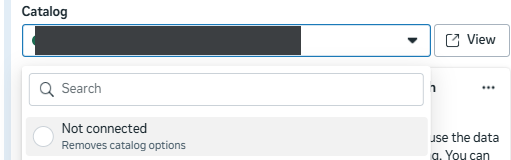
- After every duplicate, open Creative setup, confirm Products is off, and if a catalog attached itself, choose Not connected.
Table of contents
By Etgar Shpivak, Head of specialization at Ono Academic College.
Duplicating an ad is the fastest way to ship another creative or run an ad against another audience. That is exactly where Meta slips in something you did not ask for: a product catalog, on by default, in the duplicated ad.
What happened: I duplicated an ad with no catalog, and got a catalog
I built an ad with a single image and no catalog. In Creative setup everything is in order: Products is off, and it says so plainly, Turned off: Site links, Products, Summaries.
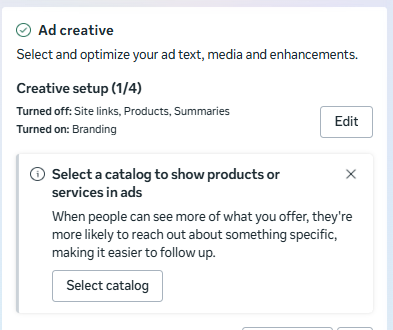
So far so good. The trouble starts on duplicate. I took that same ad and hit Duplicate inside the same Ad Set to add another creative, and in the duplicated ad the Products and services block was already on, with a catalog chosen on its own from the account's old catalogs. I did not touch it, approve it or ask for it. Meta chose for me.
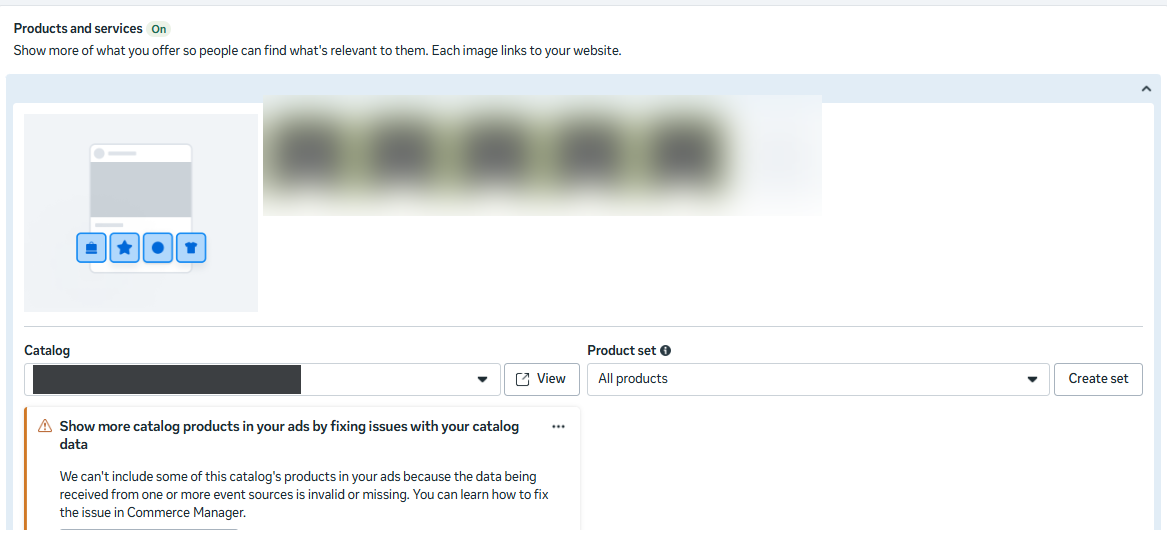 Tap to enlarge
 Anyone who duplicated an ad just to swap the image or the video, and did not scroll to the bottom, is already running a full catalog.
Why it matters, and why small budgets get hit hardest
If the catalog fits the brief, no harm done. If it does not, you have two problems: you pay for impressions on products you did not want to promote, and you promote something that may no longer be current, an old price or a program that has closed.
This is where budget comes in. On an optimized campaign with a large budget the impact is smaller. The system has enough data to learn quickly that impressions to the catalog do not produce the conversion you are after, and it shifts budget away from them. The waste is a small share of the total, and it corrects itself.
Why a small budget takes the hit
On a small budget it is the opposite. There are not enough conversions to exit the learning phase (Meta wants roughly 50 conversions a week per Ad Set), the system never learns that the catalog is not working, and a real share of your few impressions goes to products you did not want. Instead of reaching the audience the ad was built for, a tight budget is spent on something with no connection to the campaign goal at all.
Not a bug, a pattern
Meta has a long history of turning its newer features on by default: Advantage+ enhancements that add music, animation and image tweaks you never asked for, automatic placements, audience expansion that is hard to switch off, budget optimization that ships on. The catalog that lights up on its own during a duplicate is one more variation on the same principle: push the new element in as the default, and let you find it only if you were paying attention. Most of the time nobody is. A fresh example of the same habit: Meta also added auto-scroll and Autofill to lead forms on your landing page, with no off switch there either.
What to do: how to remove a catalog that turned itself on
One rule: after every duplicate, check every element in the ad, not only what you changed. The catalog is one example.
How to remove the catalog, step by step
To check the catalog, open Creative setup. Even when the summary screen says the catalog is off, once you go in you find it is actually on:
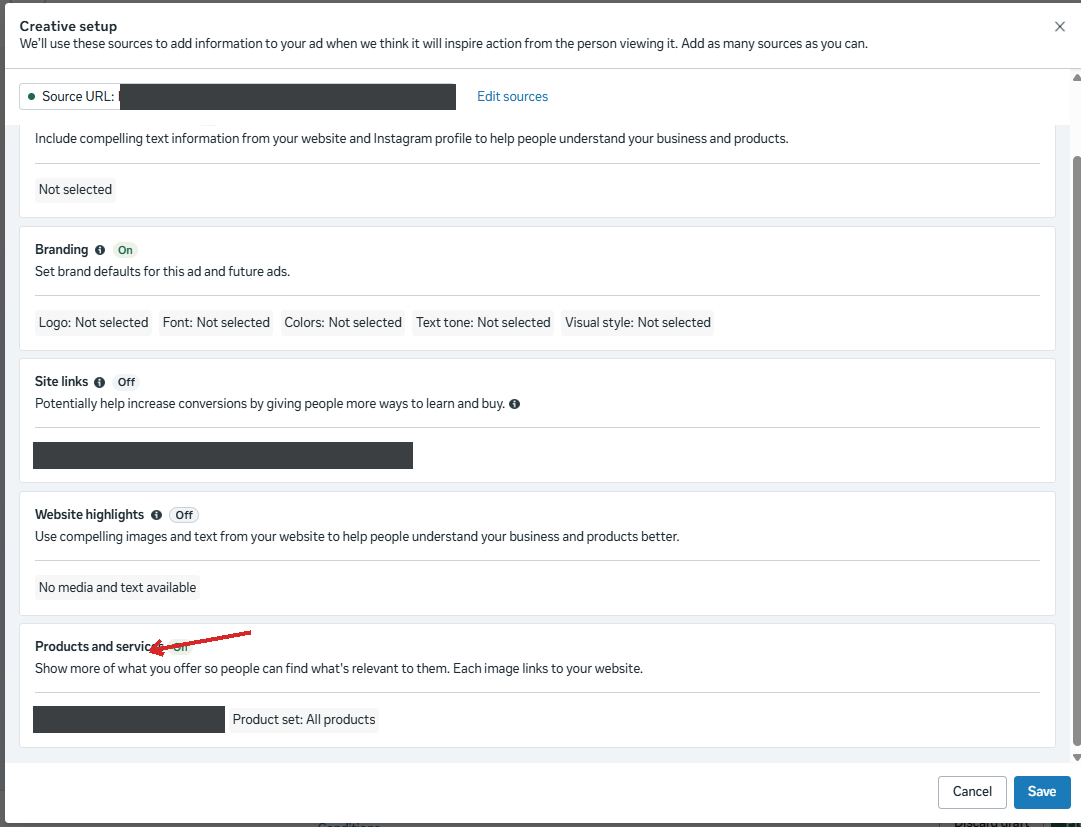 Tap to enlarge
 To remove it, click the catalog in the edit view and then the "back" arrow:
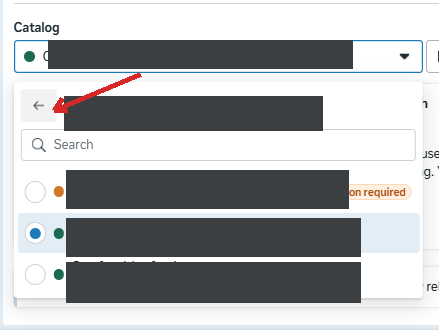
Then choose Not connected:
When you do want a catalog
And when you do want a catalog, pick it by hand and make sure it is the right, current feed, not the one Meta chose for you.
Thanks to Eli Lavi, owner of the digital agency Thinkadv, for showing me how to remove the catalog.
When the auto-catalog actually hurts
By budget and relevance
| Catalog fits the brief | Catalog is unrelated | |
|---|---|---|
| Large, optimized budget | Bonus: more relevant assets | Small waste, the system self-corrects |
| Small budget | Bonus, if the data is current | Most dangerous: much of your reach is burned |
The real risk is the bottom-right: an unrelated catalog on a small budget.
Questions and answers
Why does Meta add a catalog to a duplicated ad?
How do you remove a catalog from a Meta ad?
Does an auto-attached catalog hurt your campaign?
Do you need to check every duplicated Meta ad?
What is the Products and services block in a Meta ad?
How can you tell if a duplicated ad has a catalog attached?
Sources
- Meta Business Help Center: About the Learning Phase for the ~50 conversions a week per Ad Set figure

Cite as: Etgar Shpivak, "Meta adds a catalog you never asked for", shpivak.co.il, 9 September 2026. https://shpivak.co.il/writing/meta-ads-catalog-on-duplicate
Get the next episode by email. One email for each new episode of Founders' Marketing Compass, with the conversation, its chapters and the key takeaways, and nothing in between. Subscribe on Substack