Update · Meta Ads
The small change Meta made that could leave you with unqualified leads
A quiet change in the Facebook and Instagram in-app browser: tap an ad, and the browser jumps straight to the form and offers to fill it from your profile. Leads come in faster, and in many cases they're worse. And advertisers have no off switch.
Co-founded Fixel and ran it as CEO; Logiq acquired it in 2020. Head of specialization at Ono Academic College.
The key points
- What happened
- The Facebook and Instagram in-app browser scrolls on its own to the form on your landing page and offers to fill it from the visitor's profile. Nothing changed in your campaign.
- Who it hurts
- Anyone whose landing page persuades before it asks for details. The lead comes in before the visitor has read a word.
- What you can't do
- Turn it off. There's no setting at the ad, campaign, or account level. The only switch sits with the user.
- What to do
- A form in a popup that opens from a button, and Meta told to chase leads that turn into sales, using what your sales team records.
Table of contents
By Etgar Shpivak, Head of specialization at Ono Academic College.
Meta's browser now jumps to your form and offers to fill it
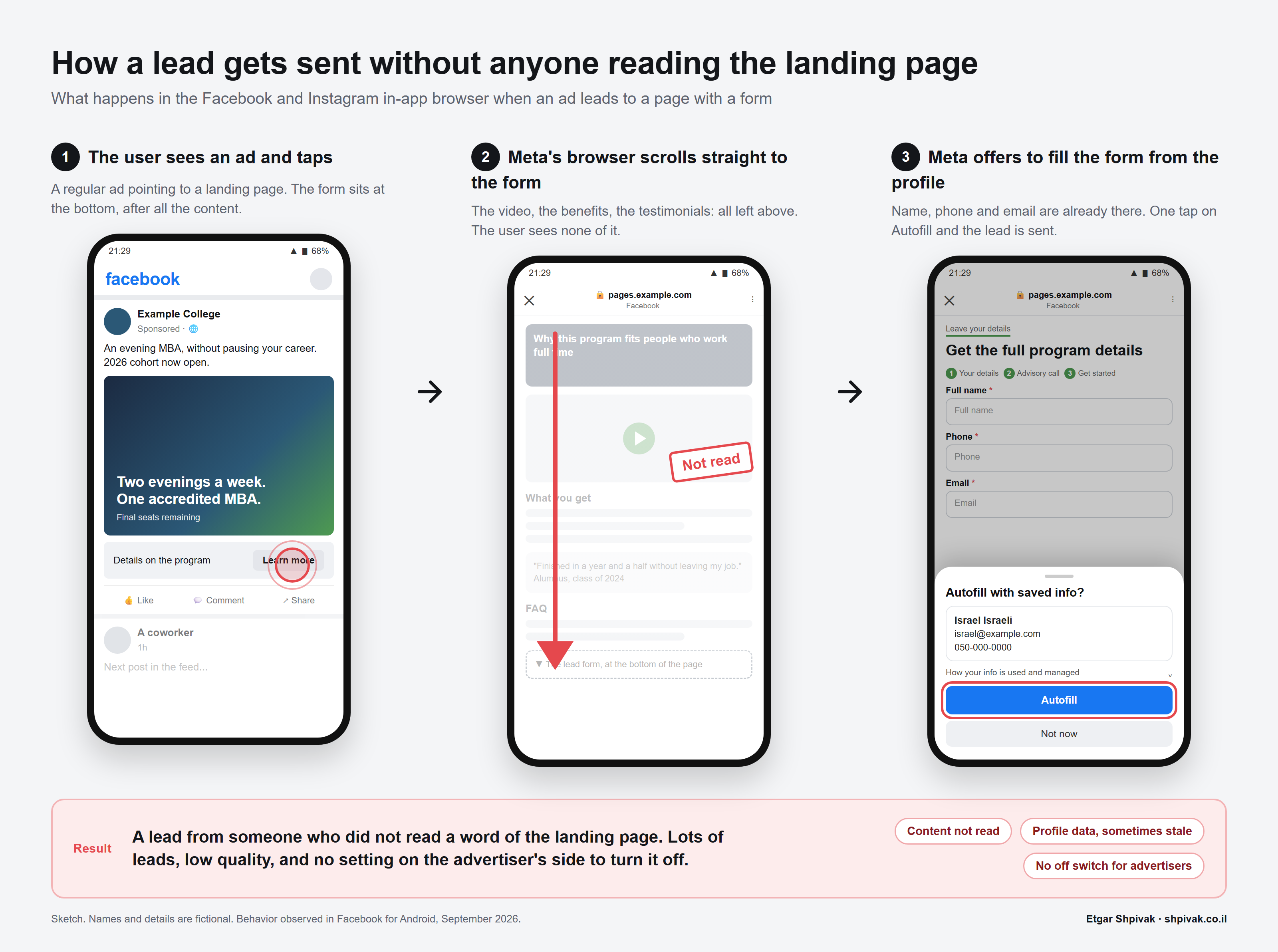
I tapped a Facebook ad that led to an ordinary landing page: headline, video, benefits, testimonials, and a form at the bottom. The page opened, and before I'd seen the headline, the browser scrolled me down to the form on its own and opened a prompt: "Autofill with saved info?" It had my name, email, and phone, straight from my profile. One tap and the lead would have gone out. I hadn't read a word.
This happens only inside the Facebook and Instagram in-app browser, the one that opens when you tap a link inside the app. None of it happens in Chrome or Safari. But on a phone, most taps on an ad open in that browser, so that's most of your traffic.
Meta's browser detects name, phone, and email fields on the page, scrolls them into view, and offers to fill them with the details the user saved in Meta Pay and Accounts Center. It needs no Instant Form (Meta's own lead form) and no setting in the ad. The same landing page that worked yesterday behaves differently today.
Good for one-tap products, bad for pages that have to persuade
If all you want is a lead the instant someone taps the ad, this is great. The product is simple, the ad is the whole pitch, and the landing page behaves more or less like an Instant Form inside Facebook or Instagram. Fewer taps, more leads, and your cost per lead drops.
If your landing page does the explaining, where visitors learn about the product or service and only then decide whether to hand over their details, the picture flips. The video, the benefits, the testimonials, and the FAQ exist so that whoever fills in the form arrives ready: they know what's on offer, what they get out of it, what it costs, and why it fits them. Now nobody sees any of it. The lead comes in cold, the sales rep does the page's job over the phone, and a good share of those leads never pick up.
Advertisers have been telling me the same thing through several channels, mostly in UA Pros, a group of high-budget advertisers inside the Growth Marketing Pros community: lead quality from Meta dropped sharply with no change to their campaigns. It matches exactly what I saw. Meta counts a win when the form goes out, and you count one when the sale closes; this feature buys you more of the first with less of the second, and that's a problem.
There's no off switch
As of today, Meta doesn't let advertisers turn this off. There's no switch at the ad, at the Ad Set (the level where you set budget and audience), at the campaign, or at the account. The one switch that exists belongs to the user, in the app's browser settings (Settings > Browser > Auto-fill contact forms), and nobody goes there. It is the same aggressive-default habit behind the way Meta adds a product catalog you never asked for when you duplicate an ad.
Don't confuse this with another Meta product that looks similar. For a few years now you've been able to pair a landing page with a Meta lead form (Meta calls it the instant form add-on: Meta's own form laid over your website). That one is opt-in: you turn it on in the ad settings, you can remove it, and you can even switch off autofill for email and phone inside it. The new behavior works on your form, inside your page, with no setting on your side. A user can't tell the two apart. You can, because you switched one of them on and nobody asked you about the other.
A popup this week, a better target for Meta this month
There are two things to do: one right away, and one that matters more.
The fix this week: move the form into a popup
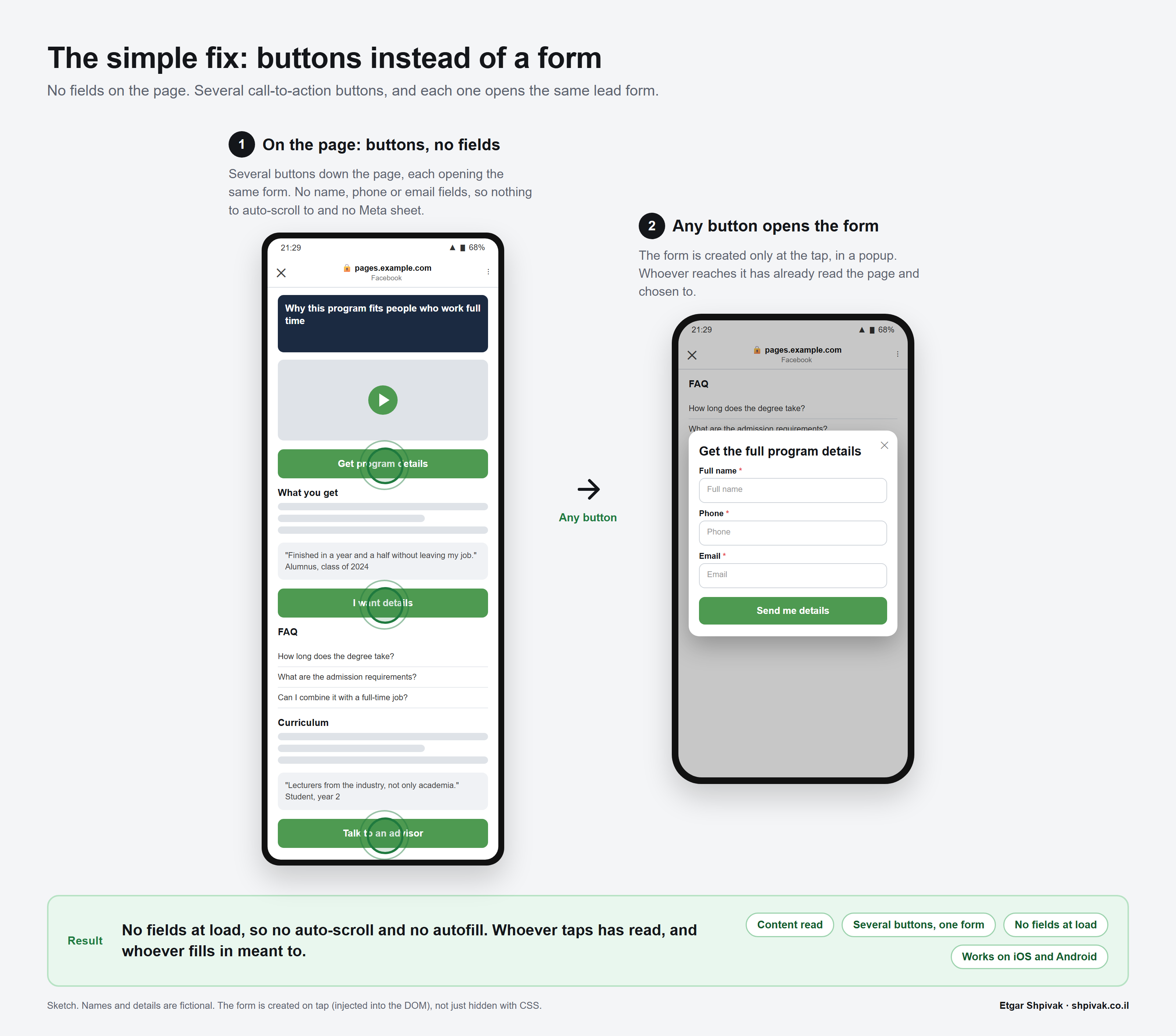
1. The simplest fix, this week: if your ads send people to a landing page, move the lead form into a popup that opens when the visitor taps a button. You can, and probably should, put several buttons down the page (the "get the details" or "talk to us" kind), each opening the same form. When the page loads there are no name or phone fields on it, so the browser has nothing to scroll to and nothing to offer. Whoever reads and taps gets the form, and if Autofill pops up then, fine: the visitor has already decided.
The lasting fix: optimize for quality leads, not form fills
2. The one that matters most, if your business runs on leads: stop telling Meta to chase form fills and tell it to chase quality leads. Connect your CRM, the system your sales team tracks leads in. Then send Meta what happens to each lead after the form through the Conversions API, the channel your server uses to report those actions to Meta: the lead answered the phone, spoke to a rep or a bot, turned out to be a fit. Then switch the performance goal, the result you tell Meta to chase, to Conversion Leads. From that point Meta looks for people who become customers, not people who tap Autofill. It takes Meta a few weeks to learn who those people are, and it needs a steady flow of leads to learn from, but it's the only fix that keeps working even when Meta changes the browser again. One more thing that matters: pick an event that lands within a few days of the lead, rather than one that takes weeks. Otherwise Meta learns very slowly, and once the event arrives more than 7 days after the lead it may stop learning from it altogether.
More ideas I've heard but haven't tested
A few more ideas I've heard about but haven't tried myself:
- Flip the order of steps in the form. If you run a multi-step form, make step 1 qualifying questions only (area of interest, background, experience, start date) and move name, phone, and email to step 2. On load there are no contact fields on the page and no prompt, and the questions do the filtering. It's the cheapest of these to build.
- Render the form late. Load it only after the visitor has scrolled 50-60% of the page or spent a few seconds on it. It's weaker, because a fast scroller still reaches the form early. There are how-to guides for it online.
- Add autocomplete="off" attributes and non-standard fields (no type="email", no type="tel", no name="phone"). It's cheap to test and unreliable: nothing says Meta's detection cares.
What to check today, in one minute
Before any of that, open your own landing page from inside the Facebook app. If the browser jumps to the form and offers Autofill, it's doing the same to everyone who taps your ad. Popup this week, a better target for Meta this month.
What to do now
Three moves, in order
- Today: check Open your own landing page from inside the Facebook app and watch whether the browser jumps to the form and offers Autofill.
- This week: buttons instead of a form Move the form into a popup. Put several buttons along the page, all opening the same form.
- This month: optimize for quality leads Send Meta what happens to each lead in its first few days (answered, qualified) and tell Meta to chase that instead of form fills.
Questions and answers
Why does the form on my landing page fill itself in when someone comes from a Meta ad?
Can advertisers turn off Meta's Autofill on a landing page?
What's the difference between an Instant Form and Meta's Autofill on a landing page?
Why did lead quality from Meta Ads drop with no change to the campaign?
How do you build a landing page that Meta's Autofill doesn't hurt?
What is Conversion Leads in Meta Ads and how does it improve lead quality?
Does autocomplete="off" stop Meta from filling in the form?
Sources
- Meta Help Center: How we use autofill Meta's own documentation of Autofill in the in-app browser, including the user-side switch
- Meta Business Help Center: Create a lead ad with instant form add-on Meta's page on the Instant Form add-on laid over a website, cited for the distinction between the two prompts
- Meta Help Center: Edit Instagram's in-app browser settings the in-app browser settings on the user's side

Cite as: Etgar Shpivak, "The small change Meta made that could leave you with unqualified leads", shpivak.co.il, 9 September 2026. https://shpivak.co.il/writing/meta-in-app-autofill
Get the next episode by email. One email for each new episode of Founders' Marketing Compass, with the conversation, its chapters and the key takeaways, and nothing in between. Subscribe on Substack